 [TP1]
[TP1]The Proving Ground. Included with membership.
Backtest your setups on the real bars that actually printed.
The eval should not be the first time your system meets the rule that fails it. This is a bar by bar futures replay on the same in-house Pine engine as the Lab. Your own indicators compute live on real CME data, killzone by killzone, with your prop firm's exact eval enforced on top. It doesn't ask you to trust the backtest. It shows you the bars.
Your Discord role is your login. The Proving Ground opens with an active Taking Prophets membership.
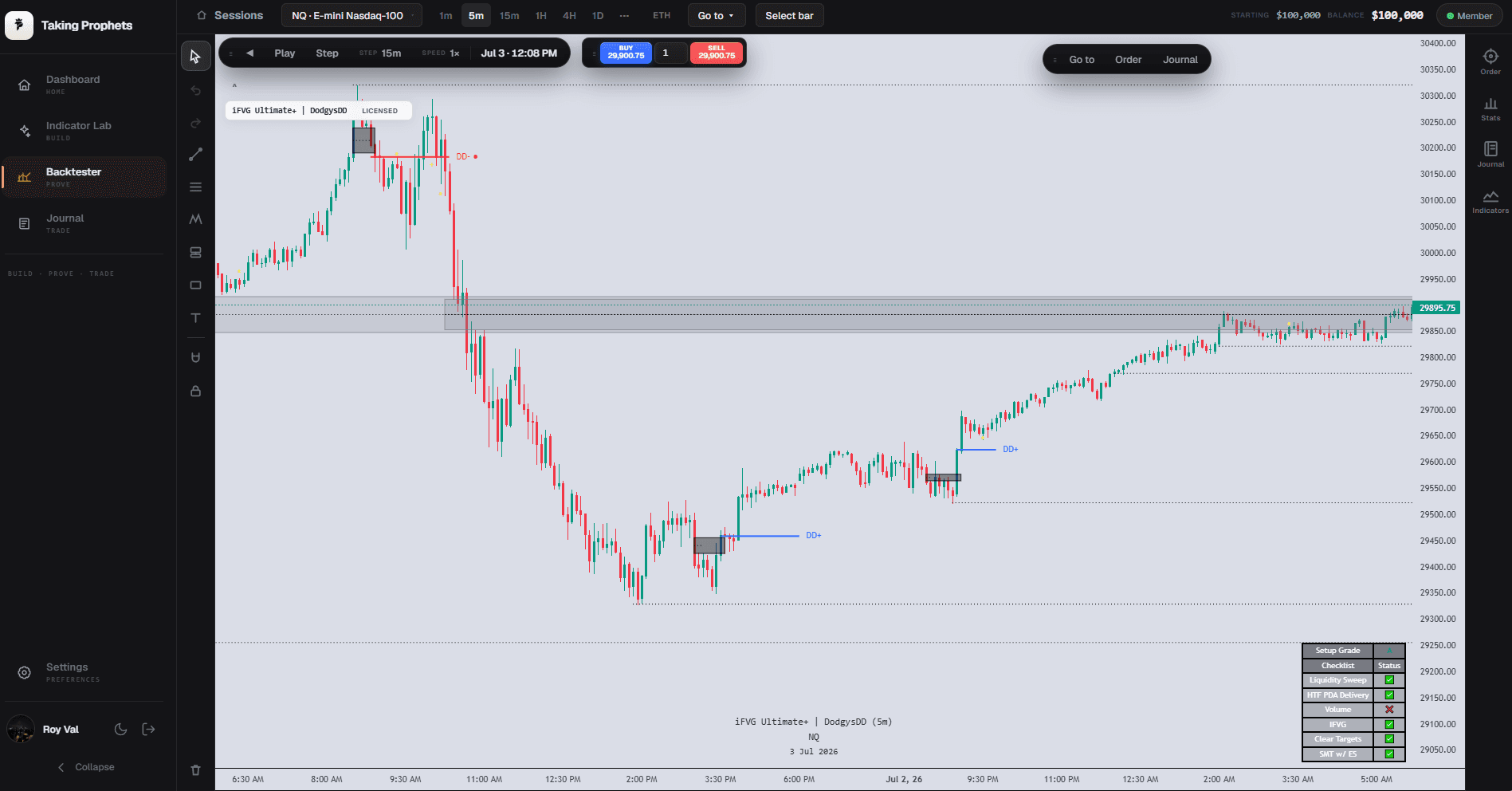
The Proving Ground itself: a real session, a licensed indicator on the chart, and the setup checklist grading the trade.
That's not backtesting. That's guessing with two extra subscriptions.
The old way
You spot the setup after the fact. You drag a slider on a chart that skips the wick that would have stopped you out. You eyeball where "price would have gone" and call it confirmation. Your indicator lives on TradingView, so it can't even load here. Then you pay a prop firm to find out, with real money, whether a trailing drawdown clips you in the London killzone.
The Proving Ground
It replays what actually happened: real CME Globex data with true 9:30 opens, the 17:00 maintenance break, the weekend gap. Your own Lab indicator runs live and leak-free against exactly the bars revealed so far, and the selected pack's supported rules run alongside every fill. The eval shouldn't be the first time your system meets the rule that fails it.
How it works. Pick a bar, load your build, step forward, keep the receipts.
Pick your bar.
Open the Start popover and drop in anywhere across the loaded history: a specific datetime, a random point for a blind rep, or the latest bar for a fresh session. Real Databento CME futures data, not a synthetic feed. It's the tape, revealed one bar at a time.
Load your own indicator.
Open Indicators, then My builds, and your private Lab library is right there. Compatible indicator builds can be added to the replay chart; strategies and unsupported Pine features are excluded. No export, no copy-paste. It is literally the same script the Lab verified. Deep-link straight from the Lab and it adds itself on arrival.
same pine-sim engine · your build, not a lookalike · leak-freeStep the market forward.
Right arrow reveals the next bar. Space autoplays at 0.5x to 5x. Jump forward to the Asian, London or New York killzone, ET-anchored, DST-correct, skipping the sessions the market slept through. Your indicator recomputes on every step against only the visible prefix. It can't see a bar you haven't revealed.
Trade it and keep the receipts.
Buy, sell, close (B / S / C) and tag the setup: FVG, OTE, silver bullet, CISD. The stats panel tallies win rate, expectancy in R and dollars, profit factor, max drawdown, an equity curve, and a by-setup breakdown that shows which model actually carried the sample. Save the session, resume it later. Every trade is journaled with editable notes. The backtest becomes a logbook, not a memory.
win rate · expectancy R/$ · profit factor · by-setup
Would you have passed the eval? Answerable, bar by bar.
Most traders blow the account, then reverse-engineer why. The Proving Ground runs your prop firm's actual rules live, per revealed minute, so you meet the breach here, on the replay, and find exactly where you would have blown it before it costs a fee. Fail it here first, for as many reps as your membership allows.
Versioned prop-rule simulations.
Supported programs are encoded as dated data packs with known gaps; these are simulations, not a guarantee of live fees, payouts or evaluation outcomes: account size, profit target, drawdown model, daily-loss action, contract caps. Each is stamped with the source URL, an asOf date and a confidence badge. Firm not in the list? Review supported custom rules and known gaps before using a pack.
Watch the drawdown line chase your position.
Trailing-intraday, trailing-EOD or static. The threshold is back-solved into an actual price on the axis and drags toward your entry as you go. Breach it and the engine force-liquidates at that bar with gap-fill honesty, then freezes trading. Apex-style lock included: once the high-water mark hits the trigger, the floor pins at start + $100.
Trade-date aware, fee-net, tier-scaled.
Daily-loss limits and trading-day counts reset on the real CME trade date, Globex 18:00 ET to 17:00 ET, not calendar midnight. Every threshold is judged net of per-side commissions. Contract caps scale by profit tier and reject the over-size entry, according to the selected pack’s dated assumptions. Live firm behavior can differ.
Then run the optimizer.
"Which firm fits this session?" replays your exact entries and exits under supported packs’ rules: re-priced commissions, contract-cap clamps, rejected trades skipped, funded payouts auto-taken. Then it ranks the fits. A pass rolls into the funded phase, where Request Payout respects the buffer, the ladder caps, the split and the lifetime limit.
Nothing on your chart is faked. Here is the engineering that makes each claim hold.
Retail replay tools give you a slider and synthetic candles. Neither TradingView bar replay nor FXReplay runs your private Pine on real futures with your prop rules enforced. This does.
Your indicator, not a lookalike.
It runs on the same interpreter the Lab uses. The identical script, imported from the Lab's own storage. No schema drift, no re-implementation, no "close enough." What you validated in the Lab is what steps through the replay.
Replay uses bounded reveal semantics.
Supported indicators use the replay reveal boundary. Historical simulation is not proof of live non-repainting behavior; inspect verification coverage and known runtime gaps.
Real CME structure, or the data doesn't ship.
Databento GLBX.MDP3. CME Globex 1-minute data, month-delayed historical tier. Not synthetic candles, not a generated price path. The ingest aborts unless the data proves CME structure: 09:30 ET opens present, zero bars inside the 17:00 to 17:59 maintenance break, a weekend gap, monotonic time.
Rolls that don't fabricate signals.
Front-month contracts (H/M/U/Z, third-Friday expiry) are stitched into one continuous series and back-adjusted by the median spread over the overlap window, to reduce roll discontinuities. Contract selection and adjustments can differ from TradingView and affect results.
Private member storage.
Your builds, drawings and saved sessions persist per member in the Lab's own storage and survive every symbol and timeframe switch. Keyed to you. What you prove here stays yours.
Bring your canon. Test it against the tape. Your words mean what they mean in the server.
Drop any of these onto real bars and watch them build. Plus 18 drawing tools: fib with the 0.705 OTE level emphasized and a .618 to .786 OTE band, XABCD, Elliott, Andrews pitchfork, Gann fan, and long/short position tools with live R:R.
Two halves of one engine. Invent it in the Lab. Prove it here.
The Indicator Lab turns plain English into Pine with build-specific verification coverage. The Proving Ground is where you take that exact build and prove it against real bars and real prop rules. Same in-house Pine engine, same storage. You invent in one and prove in the other, without ever leaving your membership.
What it costs: nothing extra. It comes with the membership.
The Proving Ground is included with TP1, the same membership that opens the Indicator Lab, the 8 TP indicators, and the member Discord. No separate purchase, no per-run charge. For comparison: a single custom Pine indicator from a freelancer runs $300 to $3,000+ and ships with no engine to verify it and no data to replay it against. Here, the build and the proving ground are the same membership.
Cancel anytime; cancelling stops the next charge. All sales are final. No refunds, including partial periods. Terms
Want to try the indicators first? The free 7-day pass puts them on your own TradingView. No card, no auto-charge. It just ends after 7 days.
Questions, answered.
Is this real market data or generated candles?
Real. It's CME Globex data from Databento (GLBX.MDP3), month-delayed to stay in the cheap historical tier, back-adjusted across contract rolls, and structure-verified on ingest: true 9:30 ET opens, the 17:00 maintenance break, weekend gaps. The member feed is real bars, bundled and refreshed periodically rather than streamed as live ticks. No synthetic price paths on the futures product.
Do my Lab indicators actually run, or is it a screenshot?
They run. Live, bar by bar, through the same pine-sim interpreter the Lab uses, imported from the Lab's own storage, so it's the identical script. "My builds" lists your private library. One click adds it and it recomputes on every step against only the revealed bars.
Can the backtest see the future or repaint?
The supported replay path enforces reveal boundaries. Bounded checks cannot guarantee all Pine behavior or live results; consult the script’s coverage and known gaps.
Which prop firms can I simulate?
Apex Trader Funding, Alpha Futures, Lucid Trading and Top One Futures are encoded, with drawdown models, daily-loss actions, contract-tier scaling, consistency and qualifying-day gates, and funded-phase payouts. Each pack is stamped with its source and date. Anything not yet covered, you build with the custom-rules panel.
What symbols and timeframes?
The shipped charts are real CME micro futures: MNQ (Micro E-mini Nasdaq-100) with an MES (Micro E-mini S&P 500) companion feed for SMT, pulled through the Databento GLBX.MDP3 pipeline. The ES and NQ minis are defined on the same pipeline. Eighteen timeframes from 1-minute to 1-month, all anchored to the 18:00 ET session so the grid matches TradingView's CME charts.
What does "prove" or "pass" mean here? Will it tell me I'll pass a real eval?
It means the simulation honestly enforces the encoded rules. It shows you, bar by bar, whether your exact entries and exits would have passed or breached a given firm's published rules over that stretch of history, and on which bar. It's a rehearsal and study tool for the mechanics. It approximates, and does not guarantee, any firm's live evaluation outcome, and makes no promise about how you'll do on a live account.
Do I need to know how to code?
No. You build indicators in the Lab by describing what you want in plain ICT, then load them here with one click from the "My builds" tab. Prefer no code at all? Add a community indicator, or just use the drawing tools and prop rules.
Do I need anything besides my membership?
No. Log in with Discord, and if you're a premium member you're in. It runs in the browser. Nothing to install, no separate data subscription, no extra fee. Your drawings and saved sessions stay yours between visits.
Stop guessing whether the setup holds. Go find out on the real tape.
Load your build. Pick a bar. Trade it under your firm's rules and see where it breaks before the eval does.
The Proving Ground and the Indicator Lab are for study and educational purposes only. Replays, indicators, statistics, and prop-firm simulations are not trading signals or recommendations, and nothing here constitutes financial advice. "Verified" and "proven" refer to engineering and rule-simulation correctness (compilation, rendering, non-repainting behavior, and faithful reproduction of published prop-firm rules), not trading performance, and no result implies future outcomes. The prop simulation approximates, and does not guarantee, any firm's live evaluation outcome. Trading futures and other instruments involves substantial risk of loss.
Taking Prophets and the Indicator Lab are not affiliated with, endorsed by, or sponsored by TradingView, or by any prop firm named on this page. Apex Trader Funding, Alpha Futures, Lucid Trading, and Top One Futures are named only to identify their published rule sets. "TradingView" and "Pine Script" are trademarks of TradingView, Inc.